Home » Blog » Artificial Intelligence
How I Used AI (GitHub Copilot) to Build Workiando Web from Start to Finish
Learn how to use artificial intelligence and GitHub Copilot to develop web applications faster: prompts, structure, best practices, and real-world examples.
Why Choose The Flock?

+15.000 top-tier remote devs
Payroll & Compliance
Backlog Management

When I started Workiando Web, I didn't have much experience with web projects, only mobile, and I wanted to have a project with the latest trends like NextJs, TailWind, etc., for the administrative side of my application.
Therefore, I purchased a GitHub Copilot license and integrated it into Visual Studio Code. I wanted to test how far I could boost productivity using artificial intelligence by providing short prompts for services, structures, and image examples.
It wasn't just about "autocompleting code."
My goal was to use AI as if it were a technical architect, frontend dev, and backend support all at once.
The Approach: Think in Prompts, Not Code
One of the most important changes was to stop thinking about "how to code this" and start thinking:
"How do I ask the AI to build it right from the start?"
Every important feature of the project began with a well-defined prompt.
For example, the start was literally:
“Create a Next.js project with TypeScript, TailwindCSS, and setup for Firebase Hosting.”
And that already gave me:
-
base project structure
-
Tailwind configuration
-
build files
-
ready-to-deploy base
I didn't start from scratch. I started from something functional.
Building the Foundation: Architecture and Order
Then I understood something key:
If you don't define the structure well from the start, AI will only generate disorder faster.
So the next step was:
“Organize the project into folders for components, hooks, services, contexts, and types.”
This was a turning point.
Because I was no longer generating loose code, but a system:
-
/components for UI
-
/services for API logic
-
/hooks for state
-
/context for global state
From there, everything Copilot generated already had a proper place to live.
Consistent Design Without Effort
Another thing that usually takes time is defining styles.
But here I used AI to speed that up:
“Configure Tailwind with a custom palette for Workiando branding.”
And with that:
-
defined global colors (theme)
-
typography
-
buttons
-
inputs
-
sizes
This made every component generated afterward come out consistently automatically.
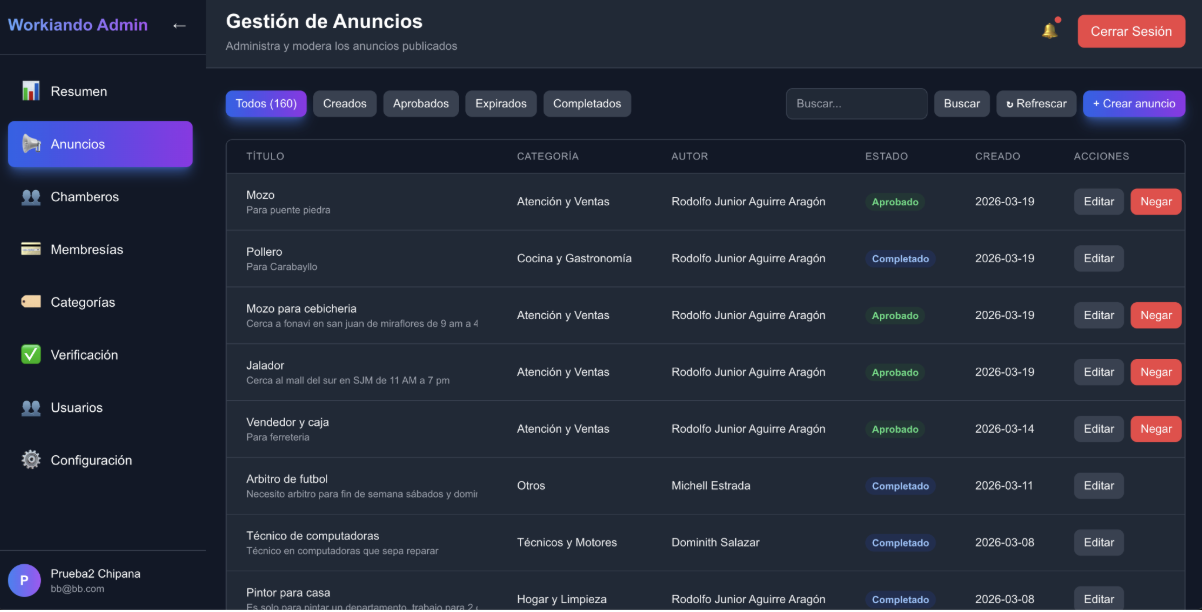
Components: From Repetitive to Reusable
Instead of creating UI piece by piece, I started thinking in reusable blocks:
-
Sidebar
-
Header
-
Tables
-
StatsCards
-
Modals
The difference was striking: the AI not only generated code, it generated reusable patterns.
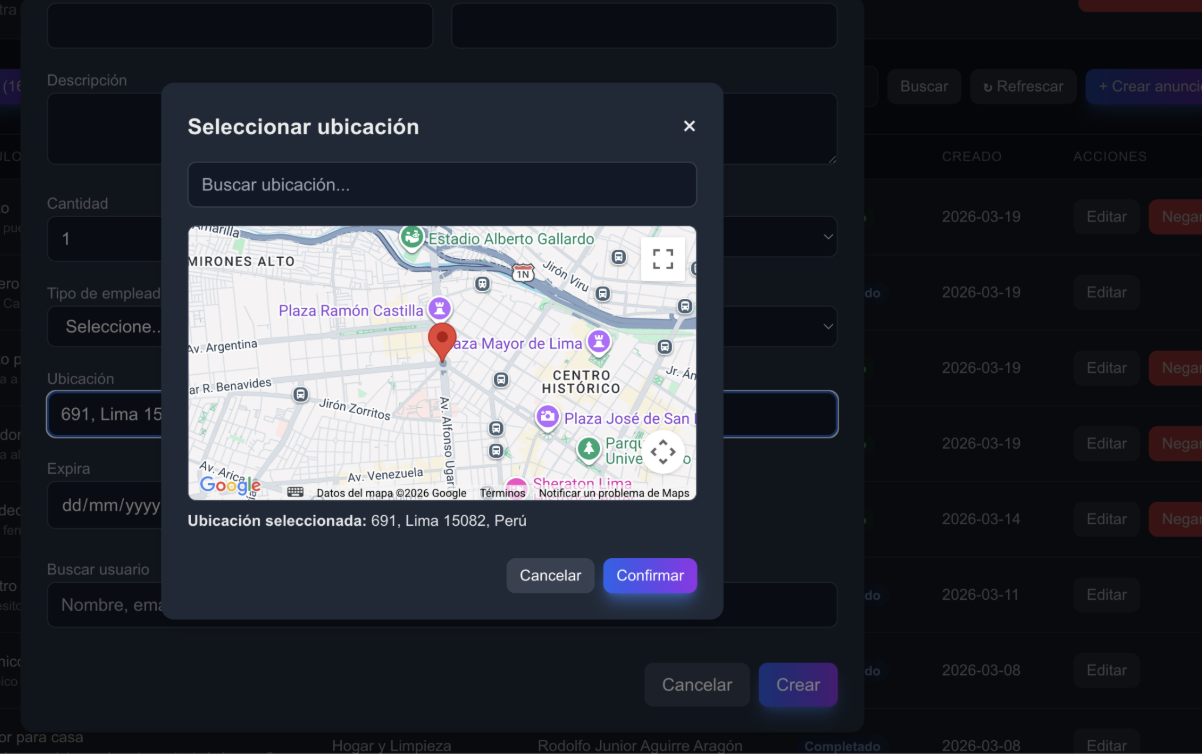
The Critical Point: Google Maps and Autocomplete
This is where AI really made a difference.
I wanted something simple at first:
-
location searcher
-
map
-
selection
But it ended up being one of the most complex parts of the project.
The prompt was:
“Implement a location selector with modal, autocomplete search (debounce), map, and confirmation.”
First, I implemented the classic Autocomplete…
but quickly realized a problem:
- too many API calls
- unnecessary costs
That's when I iterated with AI and completely changed the approach to:
-
AutocompleteService
-
controlled debounce
-
result caching
This allowed me to:
-
reduce calls
-
improve performance
-
have full control over behavior
-
build my own dropdown (not Google's default)
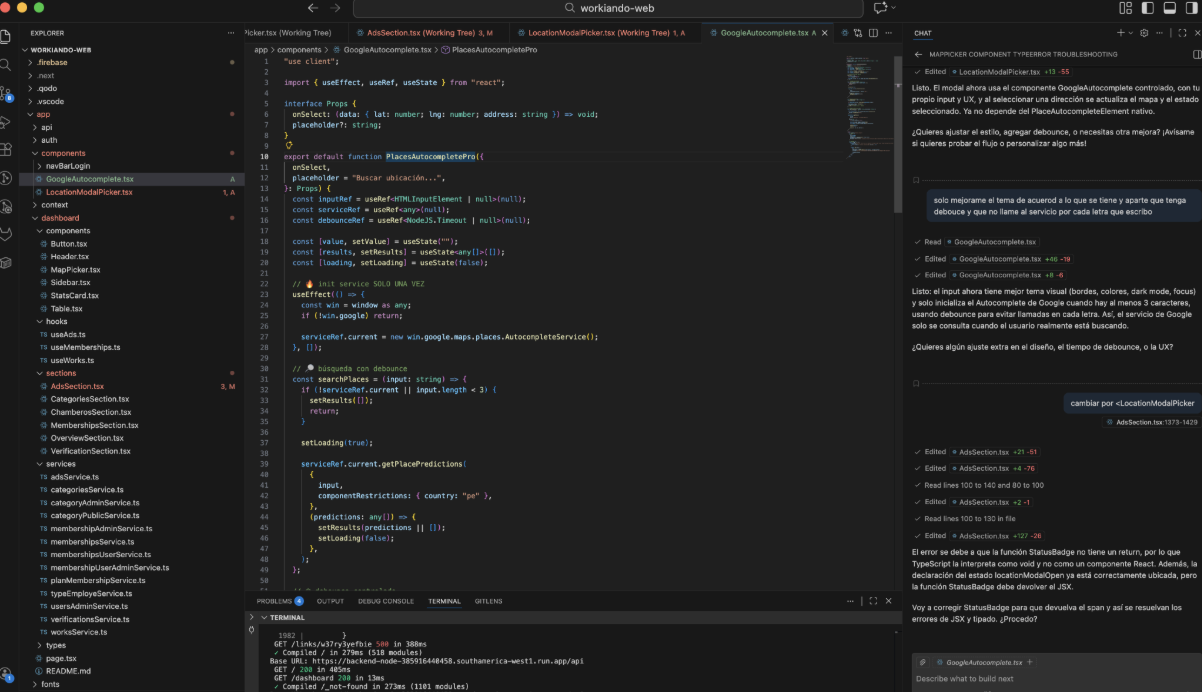
Separating Logic from UI (Key to Scaling)
Another important change was to stop mixing everything.
I used prompts like:
“Create services for ads, memberships, users, and categories using Axios with a global interceptor for global token handling and refresh token”
And then:
“Create custom hooks to handle state and data logic.”
Result:
-
clean UI
-
reusable logic
-
maintainable code
Authentication and Global State
To handle users:
“Implement an AuthContext to manage user and session state.”
This allowed me to:
-
centralize authentication
-
easily manage sessions
-
avoid props drilling
Deep Linking: Connecting Web with Mobile
One of the most interesting features was:
“Create a dynamic page /links/[id] that redirects to the mobile app or store depending on the device.”
This allowed:
-
device detection
-
redirect to app or store
-
connect the entire ecosystem
Frictionless Deployment (Firebase)
Another area where AI helped a lot:
“Configure firebase.json to support SPA, dynamic routes, and public assets.”
This solved typical problems like:
-
broken routes in production
-
SPA navigation
-
support for Next export
Integration with Backend (The Most Strategic Part)
This is where I started using AI in a much more powerful way.
Instead of writing services manually, I changed the approach to:
- Providing Copilot with real CURL examples from the backend
Key Prompt
“From this CURL, create a typed Axios service in TypeScript and a hook to consume it.”
Real Example
curl -X GET "https://api.workiando.com/ads" \
-H "Authorization: Bearer TOKEN"
AI-Generated Result
-
service (ads.service.ts)
-
typing
-
header management
-
reusable structure
Then I Scaled It to Multiple Entities
I repeated the pattern with:
-
ads
-
memberships
-
users
-
categories
Interceptor: The Key Piece
Then came one of the best decisions:
“Create a global interceptor in Axios to handle tokens, errors, and automatic refresh.”
What It Solved
-
automatically inject token
-
handle 401 errors
-
centralize headers
-
avoid repeating logic in each service
How I Integrated It
-
Defined a base client (apiClient)
-
Added interceptors:
-
request → adds token
-
response → handles errors
Result
Before:
-
each service handled headers
-
code duplication
After:
-
everything centralized
-
clean services
-
consistent backend integration
Code Quality
Finally:
“Configure ESLint and TypeScript to maintain quality and consistency.”
This helped me:
-
detect errors earlier
-
maintain strong typing
-
avoid technical debt
What I Really Learned
After all this, the biggest takeaway isn't technical.
It's this:
- AI doesn't replace the developer
- But multiplies their capacity if you know how to use it well
- To give more structured prompts, you need to have a broad understanding of the tools you should use and how to use them so the AI has a clearer concept of what you want, as describing something generic won't always give you the expected result.
The real keys were:
-
thinking in clear prompts
-
iterating (not expecting it to be perfect the first time)
-
structuring before generating
-
optimizing afterward
Conclusion
Using AI in projects, my recommendation is simple:
- Start by writing better prompts
- Short and specific prompts
- Provide contexts and examples.
- Have a clear technical understanding of all the tools to be used within the project
- Always remember to take the project structure and reuse components if necessary
- Always have control, knowledge, and steps on how to reach the desired goal.
- Keep track of the changes generated in the project for each task completed and review if there are changes in components that have already been finalized, reviewing in detail.
The idea of using AI is to understand the code it generates; only then will you know that it is structurally and functionally correct.
GitHub Copilot FAQs
1. How to use GitHub Copilot to program with effective prompts?
To use GitHub Copilot effectively, it's key to write clear and specific prompts that include the goal, technologies (like Next.js or Firebase), and expected structure, as this allows for more precise code generation from the start and significantly improves productivity by avoiding unnecessary iterations.
2. How to structure a web project with Next.js, Tailwind, and Firebase?
To structure a project with Next.js, Tailwind, and Firebase, it is recommended to organize the code into folders like components, services, hooks, and context, which facilitates scalability, improves maintenance, and allows for orderly integration of both logic and interface.
3. How to create reusable components with GitHub Copilot?
To create reusable components with GitHub Copilot, it's important to request complete UI blocks like headers, sidebars, or modals instead of isolated code, which helps reduce duplication, maintain design consistency, and accelerate
Why Choose The Flock?
+15.000 top-tier remote devs
Payroll & Compliance
Backlog Management